New in Tally: 50/30/20 Budgeting, Budget Sorting, and a No-Budget Radar
Three budgeting upgrades just shipped to every Tally Personal Finance account: a built-in 50/30/20 check that classifies every category as a Need, Want, or Saving (targets adjustable), sortable budgets — including a custom order that sticks — and a right-rail radar that surfaces spending in categories you haven’t budgeted yet.
The 50/30/20 rule, built into your real numbers
The 50/30/20 rule — 50% of income to needs, 30% to wants, 20% to savings — is the most useful budgeting heuristic ever written, and almost nobody actually checks themselves against it, because doing so means classifying every expense by hand every month.
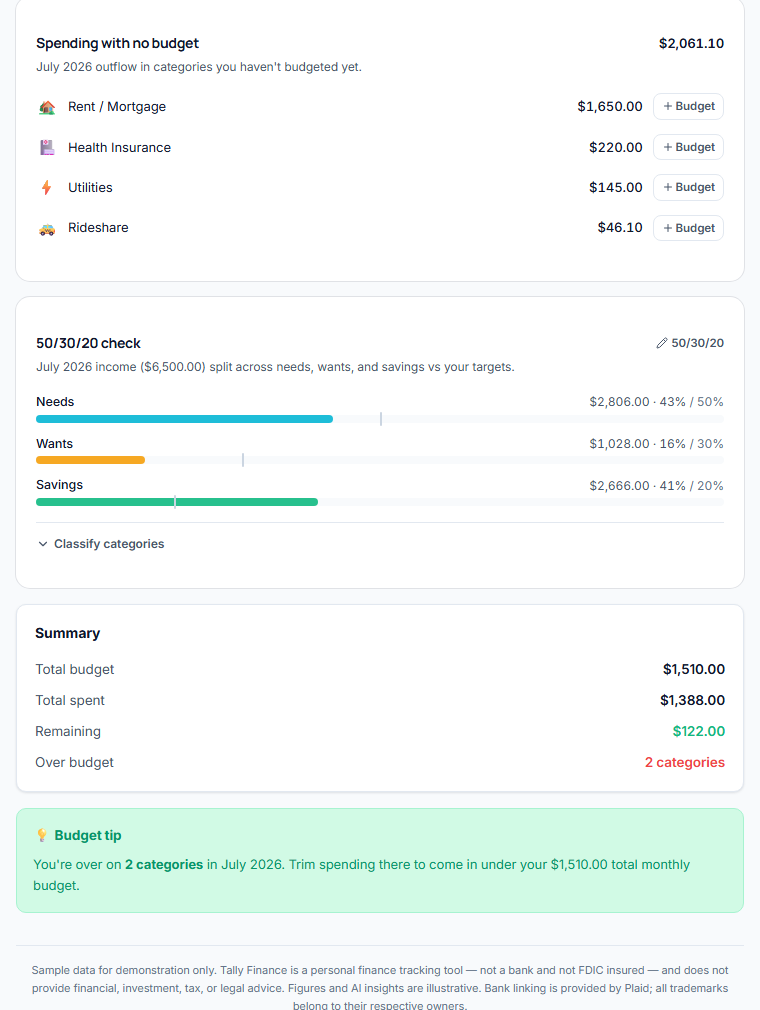
Tally now does the classifying. Every spending category carries a Needs / Wants / Savings class — rent, utilities, groceries, and insurance start as Needs; dining, streaming, and shopping start as Wants; investment and savings transfers start as Savings. One click reclassifies anything, either from the budgets page or right in the transaction editor where you’re already categorizing. The Budgets tab then shows your month’s income split across the three buckets against your targets, with a tick mark on each bar for where the target sits.
And because 50/30/20 is a starting point, not scripture: the targets are editable. High-cost-of-living city where needs run 60%? Set 60/25/15 and Tally checks you against that instead.
A radar for spending with no budget
Budgets have a blind spot: they only watch the categories you remembered to budget. The money that slips through is, by definition, in the ones you didn’t.
The Budgets tab now lists every category with outflow this month and no budget assigned — with the amount, and a one-click button that opens the budget form with that category pre-filled. Covering a gap takes about three seconds. Uncategorized spending shows up there too, as a nudge to categorize it.
Sort budgets your way — and keep it that way
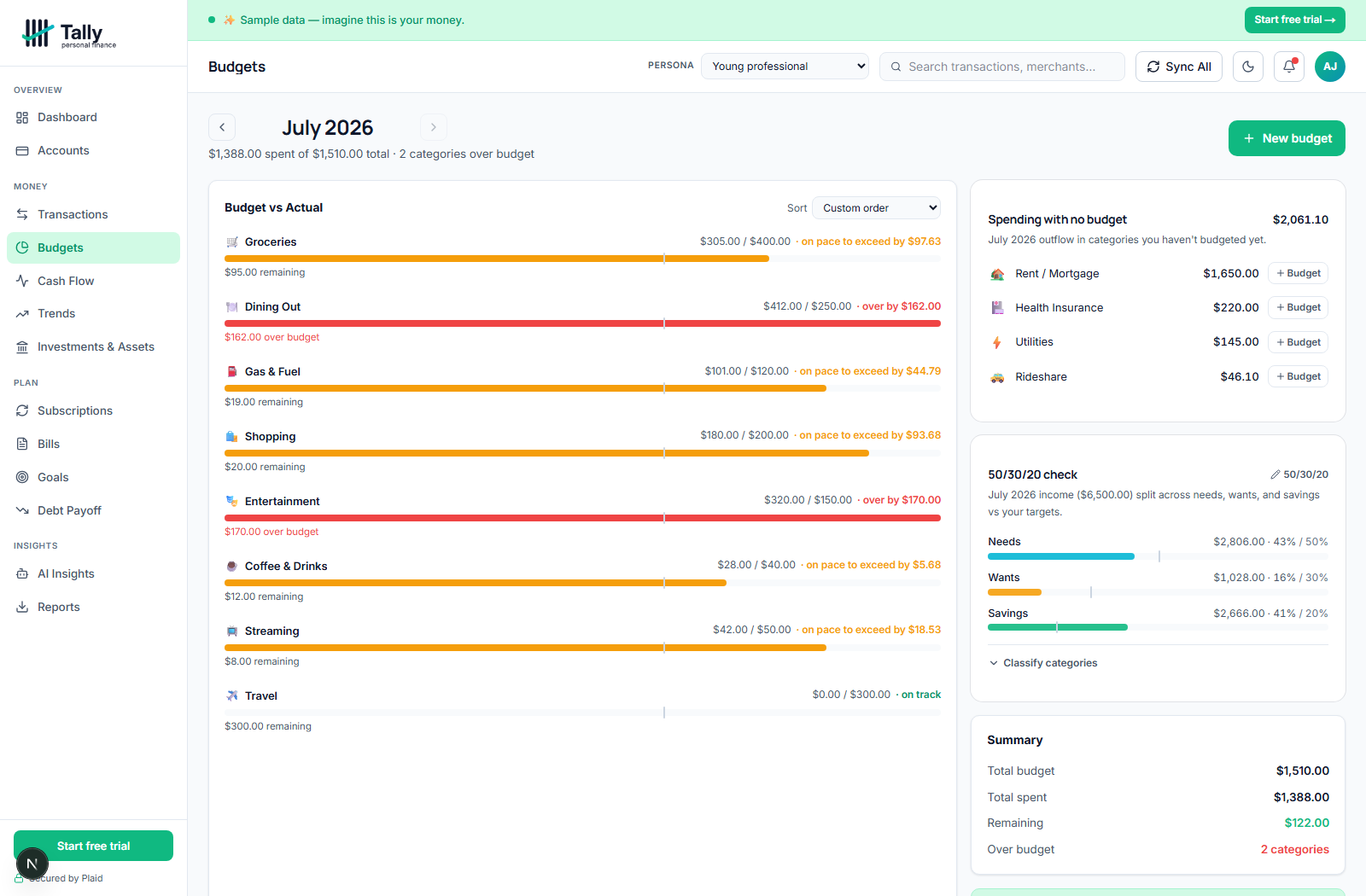
Budget lists have an order problem: alphabetical buries what matters, and by-amount changes daily. You can now sort budgets by name, budget amount, amount spent, or percent used — or pick Custom order and arrange them yourself with up/down controls. Your custom order is saved to your account, and your sort preference sticks between visits.
Also new this week
- Per-account trend sparklines — every account on the Investments & Assets page now shows its own 90-day trend line and percent change, so you can see which holding moved without opening each one.
- Predictive budget pace — budget bars show a tick at today’s expected spend and say “on pace to exceed by $X” before you cross the line, not after.
- A “What changed” strip on the dashboard — the two or three deltas that matter this month, above the fold.
Where to find it
Everything above is live now for every plan — no settings to enable. Open the Budgets tab to see the 50/30/20 check and the no-budget radar; the classifier is under “Classify categories” there, and also appears in the transaction editor whenever a category is selected. You can try the whole thing with sample data in the live demo before connecting anything.
Frequently asked questions
What is the 50/30/20 rule?+
A budgeting guideline: put roughly 50% of after-tax income toward needs (housing, utilities, groceries, insurance), 30% toward wants (dining, entertainment, shopping), and 20% toward savings and debt paydown. It’s a sanity check on the overall shape of your spending rather than a line-item budget.
Can I change the 50/30/20 percentages in Tally?+
Yes. The targets default to 50/30/20 but are fully adjustable from the Budgets tab — set any split that adds up to 100% and Tally checks your actual months against your numbers.
How does Tally decide what counts as a need vs a want?+
Sensible defaults by category (rent, utilities, groceries, insurance, and similar start as Needs; discretionary categories start as Wants; investment and savings categories start as Savings). Every category is reclassifiable in one click, from the Budgets tab or the transaction editor.
How is savings calculated in the 50/30/20 check?+
Savings is everything income didn’t go to needs or wants: explicit transfers to savings and investment categories, plus whatever income was simply left unspent. If a month has no recorded income, Tally shows the split of outflow instead.
Does the custom budget order sync across devices?+
Yes — the custom order is saved to your account, so it’s the same on every browser. The choice of which sort mode to use is remembered per browser.
Is any of this a paid add-on?+
No. Tally Personal Finance has one plan with every feature included — these updates are live for all members and visible in the free live demo.
Track all your money in one place
Tally Personal Finance connects your banks and shows budgets, net worth, and subscriptions automatically. Free for 30 days.
Start free